
Bring your own key to code review
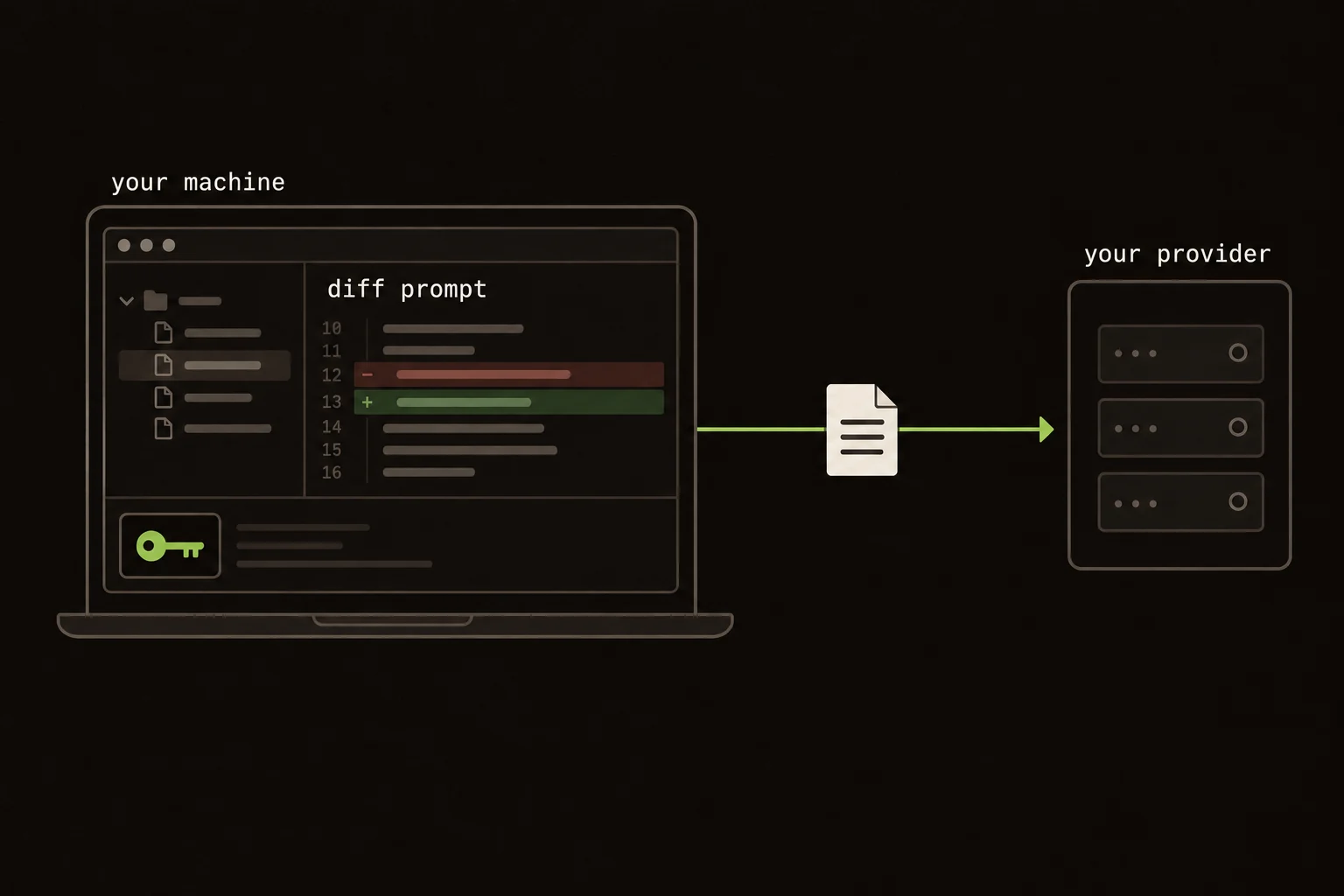
“Bring your own key” tells you who pays for inference. It doesn't tell you that your code stays on your machine.
In Guided Review, AI structuring sends a prompt built from your diff to Anthropic, OpenAI, or Grok using your account. There's no Guided Review backend between you and the provider. The provider still receives the prompt.
I'd check that request path before treating BYO key as a privacy answer.
A quick review path:
- Check what code goes to your provider.
- Understand which actions make model calls.
- Choose an account and model you can use.
- Keep review evidence independent of model commentary.
On this page
Follow one AI structuring request
Start the local CLI. You get one review unit per file. Starting the server doesn't ask a model to organize anything.
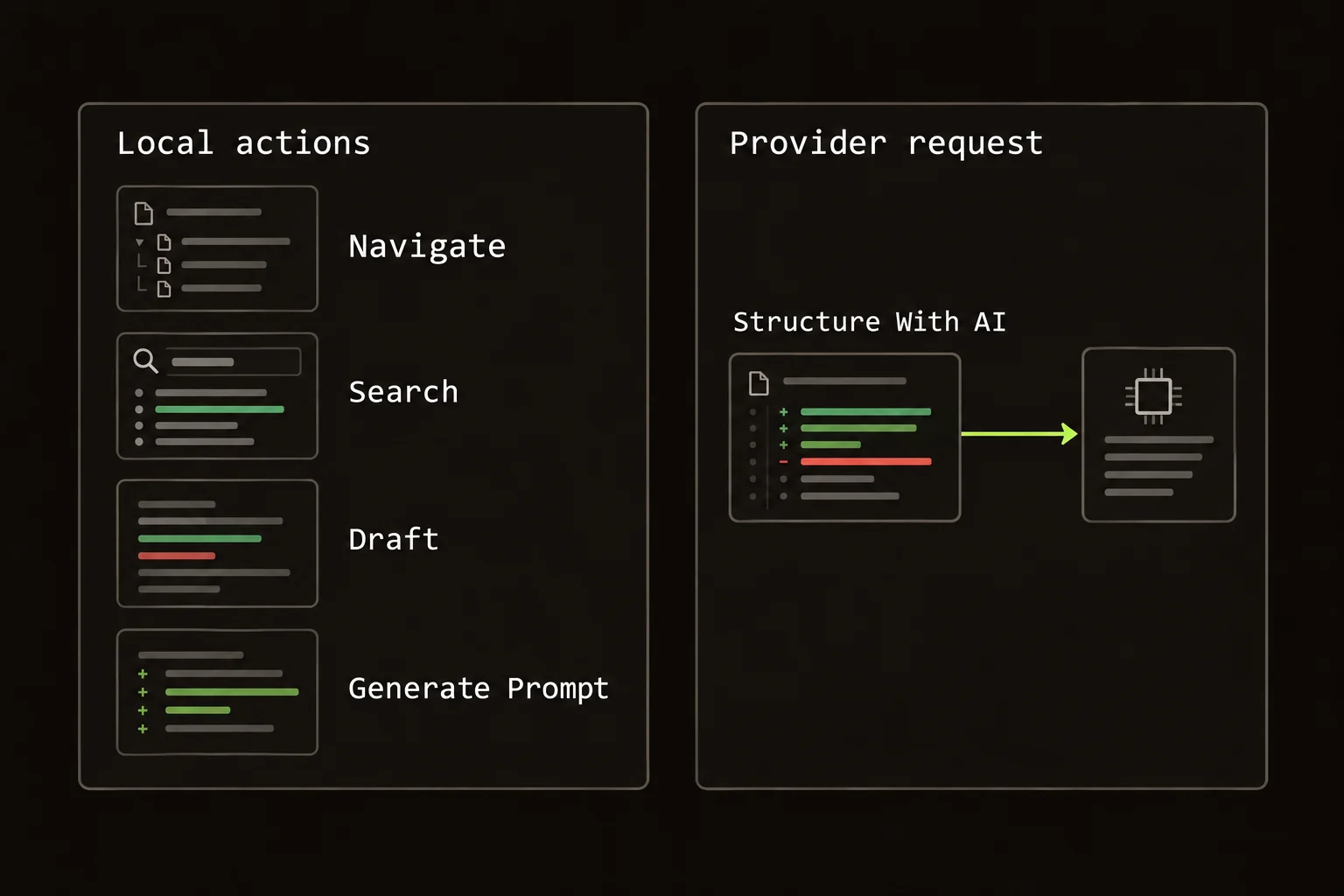
Choose Structure With AI and the local process builds a prompt from the diff, then sends it to your configured provider. The response groups and orders real hunks into review units with commentary. Displayed code still comes from git.
The extension uses the same engine, with the request running in its background worker. It also talks to GitHub to fetch PRs and submit reviews you choose to send.
Neither host sends review data to a Guided Review product backend. Both AI paths send code to a third party.
Count model calls, not clicks
Guided Review is free and Apache-2.0. Model usage is billed to your provider account.
Structuring makes one annotate call per diff chunk. Large diffs are chunked by file at roughly 60,000 characters. A file is never split, so one large file can exceed that target.
Characters aren't tokens. That number isn't a price estimate.
Walking units, searching, drafting comments, and submitting a review don't call the model again. Neither does Generate Prompt, which formats local notes for copying. Running structuring again does.
I'd check the selected model and diff size before estimating cost. I can't give you a useful dollar figure for a diff I haven't seen.
Inspect the payload before choosing the account
Think about the content of the diff, not just the repository's visibility. A private repository can contain routine application code; a public patch can accidentally include credentials, customer examples, or internal endpoint names. AI structuring builds its prompt from the changed code, so those details matter even when the account itself is approved.
Choose a scope that contains the work you intend to review. In the CLI, a branch comparison and an uncommitted comparison can expose different files. Inspect the file list before requesting structure. Removing a sensitive file from the working tree does not remove it from a committed branch diff, and hiding a panel in the UI does not establish that it was excluded from the prompt.
If you find a secret, handle it through the repository's normal credential process before sending the patch anywhere. The file-by-file walkthrough remains available without AI. That gives you a way to read and correct the patch while the provider decision is unresolved, rather than treating model setup as a prerequisite for reviewing code.
Separate provider identity from model availability
Confirm both the selected provider and the model your account can call. A valid API key does not guarantee access to every model, and a model identifier by itself does not tell you which account will be billed. In the CLI, flags and environment settings can override saved configuration for the current run. Read the active settings instead of relying on a value you saved last week.
Keep a record of custom endpoints or model IDs where your workflow requires them, and check them when diagnosing a failed request. If your chosen model becomes unavailable, choose a replacement deliberately. A failed call is not a reason to quietly change the provider account or broaden where repository code may go.
When asking for help, share the error and the relevant nonsecret settings. Do not include the API key or paste a private diff into an issue merely to demonstrate the problem. The configuration documentation explains the supported setup paths without requiring you to expose credentials in a public conversation.
Diagnose a failed request before retrying
Start with what failed: authentication, model access, request size, rate limiting, or response processing. An authentication failure calls for checking the account and credential source. A size failure calls for inspecting the selected diff and the provider's accepted context. The same retry action will not solve both.
Guided Review chunks large diffs by file, so a single unusually large file can still produce a large request. Reducing the review scope may help, but only if the smaller scope remains useful for understanding the change. Do not remove the caller that explains a contract merely to make a request fit; read that dependency separately and record the limitation.
Check provider usage when repeated attempts matter to your budget. A retry after a partial response may represent another request even if the first walkthrough never became useful. Navigation and comment drafting are different: they do not require another structuring call. That distinction lets you keep reviewing an existing plan without treating every interaction as another inference charge.
Check where keys and review state live
Extension keys and settings live in chrome.storage.local. Active review state lives in chrome.storage.session.
CLI settings live in ~/.config/guided-review/config.json, unless you override the config directory. The CLI can also use supported environment and agent sources. The provider configuration guide covers setup; the privacy and data guide covers traffic and clearing local data.
Website analytics are separate. The marketing site may record page views and CTA clicks. The extension and CLI have no product analytics.
What BYO key leaves for you to decide
Your provider's retention, training, regional, and account terms still apply. The location of the key doesn't establish any of them. Check the terms for your account and the rules for the repository you're reviewing.
BYO key fits someone who already has an approved provider account and wants to choose the model. It adds setup if you'd rather have inference bundled into a managed service. Guided Review has no company-managed key, central administrative controls, or product bill that includes model usage.
If repository policy forbids sending the diff to that provider, keep the file-by-file walkthrough or use an approved workflow.
Your key doesn't make the request local.
Keep review evidence independent of the model account
The model's role is to organize the reading and add commentary. The useful output of your review is still an explanation grounded in code: the contract you checked, the input you traced, the assertion that distinguishes the intended behavior, and any unresolved question. Those facts should survive changing providers or disabling AI structuring.
For a team, put durable decisions in the PR rather than a private walkthrough or provider conversation. Ask the author to record compatibility constraints and the actual checks run. Another reviewer can then assess the same evidence with a different model or a file-by-file plan.
If your organization changes its approved provider, treat the switch as a configuration and policy decision. Verify the selected account, model, endpoint where applicable, and allowed repository scope before the next request. Local key storage reduces the number of product services involved, but it does not replace that decision or make provider terms identical across accounts.
FAQ
Does bring your own key keep the diff on my machine?
No. AI structuring sends a prompt built from the diff to your selected provider. Bring your own key removes a Guided Review inference account, not the provider request.
Which providers can I configure?
Guided Review supports Anthropic, OpenAI, and Grok. The extension stores its key in chrome.storage.local; the CLI uses its config file or supported environment and agent sources.
Does every click create a model charge?
No. Structuring makes one annotate call per diff chunk. Navigation, search, drafting, review submission, and Generate Prompt do not call the model again.