
CLI
The Chrome extension reviews GitHub pull requests. The CLI reviews a local branch, a commit, or your working tree with the same engine and walkthrough — before you open a PR, or when there isn’t one. It does not structure the walkthrough with AI until you ask. Choosing between hosts: Install.
Run it
Node.js 22 or newer:
npx @guided-review/cli
Pass flags after the command:
npx @guided-review/cli --base main --no-open
The published package is @guided-review/cli. The binary is guidedreview. npx guided-review (unscoped, hyphen) is a different package. From this repo: pnpm build:cli then pnpm review (flags after --).
The CLI binds 127.0.0.1:7182 (ASCII G+R), keeps a short terminal banner (URL, diff, last pull), and opens the UI unless you pass --no-open. Only real events (structure, scope change, errors) go to the log below. Override with --port. --port 0 picks any free port. Ctrl+C stops the server.
What it compares
The header shows the current branch and the base branch. A dropdown picks the diff:
- Branch vs base — committed work on this branch since it diverged from the base (
git diff <merge-base> HEAD) - Uncommitted — staged and unstaged work versus
HEAD(untracked files included unless you passed--no-untracked) - Unstaged — worktree versus the index only
- A specific commit — that commit’s patch
Default selected scope: the first non-empty of branch, uncommitted, unstaged, then the newest commit. --staged starts on index-only uncommitted work.
Base resolution, in order: --base → origin/HEAD → main → master.
If every scope is empty: Nothing to review against <base>. and exit 0. Not a git repo: an error that says what failed.
Follow the Walkthrough
The review starts in Files, where you can inspect every changed file. Open Review units and choose Generate review units for the opt-in LLM call — same pipeline as the extension (How a review plan works). It groups files and adds context; it does not review for you.
Press d to open the scope dropdown, ⌘/Ctrl + I to structure, or ⌘/Ctrl + , for Settings — same keys as Keyboard shortcuts → Local review. Navigation, diff search, and comment mode share the extension shortcuts where they apply.
Unlike the extension, there is no GitHub submit from the CLI UI. Line notes are saved locally in the repository’s Git directory. Generate Prompt copies them without removing them.
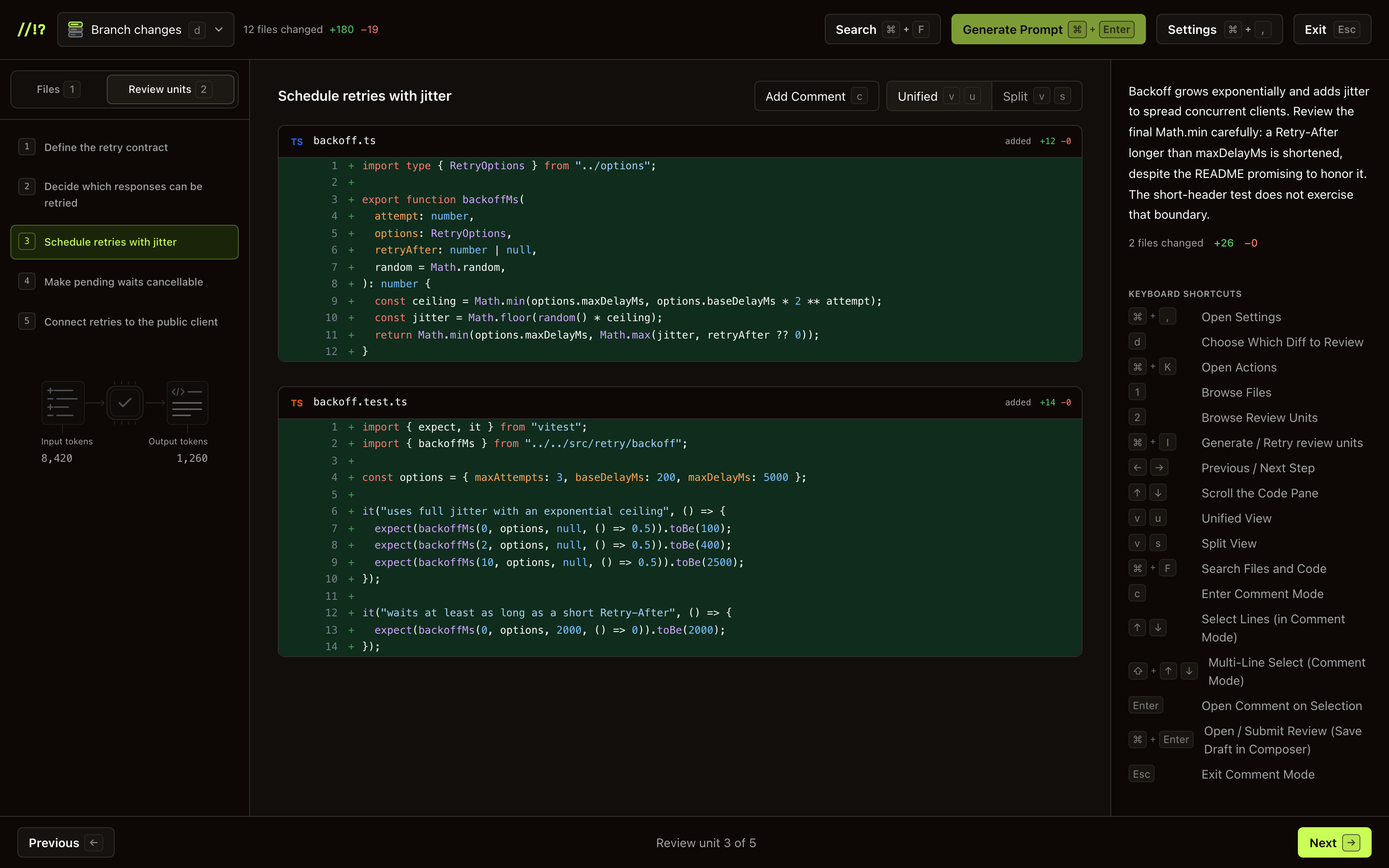
The sample branch after review units are generated. Select the screenshot for full size.
API keys
Same providers as the extension: Anthropic, OpenAI, Grok. Full setup (including borrowing a coding-agent subscription): Configure AI provider → CLI.
Resolution, in order:
--provider/--model/--agentand env (ANTHROPIC_API_KEY/OPENAI_API_KEY/XAI_API_KEYorGROK_API_KEY)- A key already saved in
~/.config/guided-review/config.json - A coding agent already on this machine (Claude Code, Codex, or Grok)
If more than one agent has a usable key, the CLI asks which to use each run (Enter keeps the last choice). The chosen agent is shown in the browser UI. It reads the agent's own store at review time and does not copy the secret into Guided Review config.
Without a key you can browse changed files. Open Review units and choose Connect AI Provider, or press ⌘/Ctrl + I, to configure one.
The local UI has Settings (header, ⌘/Ctrl + ,, or Connect AI Provider when no key is set). Paste an API key, or turn on Use My Subscription to borrow Claude Code / Codex / Grok on this machine. A saved API key always wins. Subscription is unofficial and can break — a console key is the better option. Save writes the config file below. Flags and env still win for that run.
Config file
Saved prefs live at ~/.config/guided-review/config.json, or:
$XDG_CONFIG_HOME/guided-review/config.jsonwhenXDG_CONFIG_HOMEis set$GUIDED_REVIEW_CONFIG_DIR/config.jsonwhen that env var is set (wins over XDG / home)
Example shape (all fields optional — only what you saved appears):
{
  "provider": "anthropic",
  "model": "claude-opus-5-5",
  "apiKey": "sk-ant-…",
  "codingAgent": "claude-code"
}
| Field | Meaning |
|---|---|
provider | anthropic | openai | grok |
model | Provider model id (any id your account can call) |
apiKey | Console API key for that provider |
codingAgent | claude-code | codex | grok when using Use My Subscription |
Prefer editing through Settings in the UI. If you hand-edit the file, restart the CLI (or re-open Settings and save) so the running server picks up the change. Flags and env still override the file for that run. Clearing a key: remove apiKey from the file, or clear it in Settings — Privacy & data → Clear data.
Notes
Line comments stay in the session. There is no GitHub submit from the CLI. Generate Prompt builds a coding-agent prompt from those notes and copies it — Guided Review does not send it anywhere. Full walkthrough: Generate Prompt. On a GitHub PR, use the extension to draft and submit instead.
Session and refresh
The CLI saves the diff, AI structure (when requested), navigation, scroll positions, saved notes, and unfinished composers in <git-dir>/guided-review/sessions/. Find the actual Git directory with git rev-parse --absolute-git-dir; linked worktrees have separate storage. Sessions use private file permissions and atomic writes. Provider credentials stay in their separate settings storage.
Restarting the CLI against the same repository, base, branch, and scope restores the saved review, even on a different local port or in a new tab. Notes written before requesting AI structure are saved too. Staged-only and untracked-file options have separate session identities. A matching legacy tab session migrates when no disk session exists.
When files change, the saved review keeps its original diff and notes and shows a stale banner. Notes are not automatically moved onto changed lines. Reloading resumes the saved snapshot; it does not discard feedback. Switching scope saves the current review and restores that scope’s saved review, or opens its Files view if none exists.
Saves happen while you work. A save error appears in the UI; notes remain in the tab, and scope switching waits for a successful save. Closing the tab before a failed save succeeds can lose those unsaved changes. Unload flushing is best effort.
Storage keeps up to 20 sessions for 30 days; pruning runs on successful saves and is best effort. To explicitly remove saved review data, stop the CLI, remove <git-dir>/guided-review/sessions/, and clear sessionStorage for any open local review tabs. To review changed code from scratch, first copy notes with Generate Prompt, then clear saved review data and restart. Provider settings live separately in the config file, and the diff view preference lives in browser localStorage.
Flags
guidedreview [dir] --base main --port 8787 --no-open --staged --no-untracked --agent claude-code
| Flag | What |
|---|---|
--base <ref> | Base branch |
--port <n> | Listen port (default 7182) |
--no-open | Print the URL without opening a browser |
--staged | Start on staged changes |
--no-untracked | Skip untracked files |
--provider <id> | anthropic | openai | grok |
--model <id> | Provider model id |
--agent <id> | claude-code | codex | grok |
Problems starting the server or structuring a plan: Troubleshooting → CLI.
Next. Chrome Extension · Configure AI provider · Generate Prompt · Reading the overlay · Keyboard shortcuts