
Generate Prompt
Turn line notes from a local CLI review into a coding-agent prompt you can paste yourself. Guided Review builds the text and copies it — it does not send the prompt to an agent or to GitHub.
On a GitHub PR, use the Chrome extension to draft and submit instead.
When to use it
Use Generate Prompt when you reviewed a local branch, commit, or working tree with the CLI and want a coding agent (Claude Code, Codex, Grok, etc.) to apply the feedback you left as notes.
Typical loop:
- Run
npx @guided-review/cliand follow the walkthrough. - Draft notes on the lines that need fixes or questions.
- Generate Prompt → paste into your agent → iterate.
Leave notes first
Generate Prompt is built only from the notes in the current session. With zero notes, the header button stays disabled and ⌘/Ctrl + Enter does nothing useful — leave at least one draft first (comment mode).
Notes are saved in the browser tab’s sessionStorage. Reloading can restore them for the same diff; stopping the CLI does not clear browser storage. Copy notes before refreshing a changed diff or switching scope. Details: CLI → Session and refresh.
Open Generate Prompt
In the local UI:
- Click Generate Prompt in the header (same place the extension shows Submit Review), or press
⌘/Ctrl+Enterwhile not typing in the composer. - A dialog shows the full prompt text.
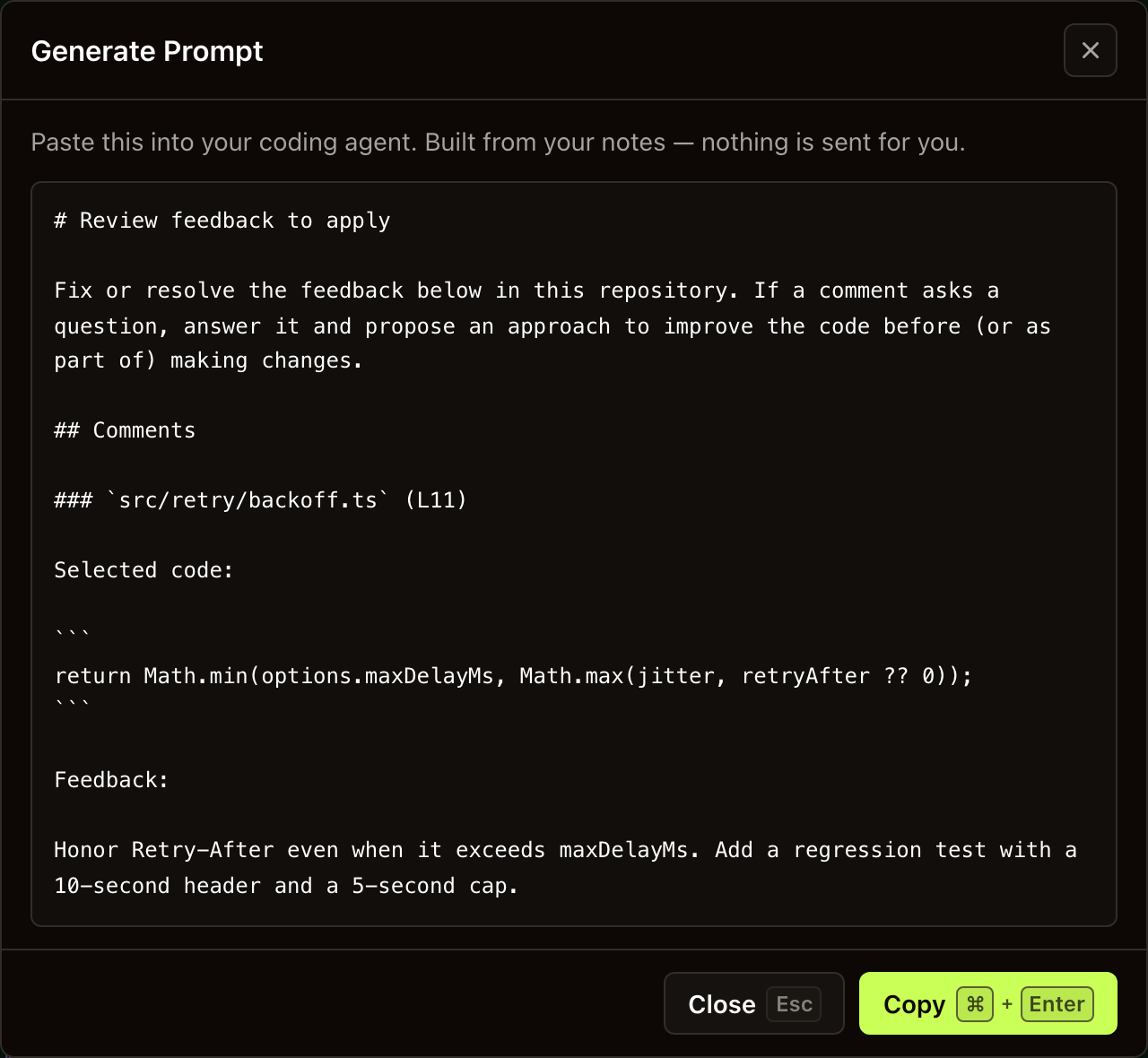
A prompt built from one note on the sample branch. Select the screenshot for full size.
Shortcut context: Keyboard shortcuts → Local review.
What the prompt contains
The prompt is plain Markdown produced by the shared formatter — not another LLM call. For each note it includes:
| Piece | Source |
|---|---|
| File path | The file you commented on |
| Line range | Single line or multi-line selection |
| Selected code | The diff lines under the selection, if any |
| Feedback | The note body you wrote |
The header asks the agent to fix or resolve the feedback (and answer questions when a note is a question). Walking units and drafting notes do not call your provider again for this step (Configure AI provider → Cost).
Copy and paste
- Review the text in the dialog.
- Copy with the dialog’s copy control, or
⌘/Ctrl+Enterwhile the modal is open. - Paste into your coding agent’s chat or prompt input.
- Close with
Escwhen done. Copying and closing leave your notes in place; remove individual notes from their draft cards when you no longer need them.
Nothing leaves your machine through Guided Review for this path — clipboard only (Privacy & data).
What it does not do
- Does not post a GitHub review (that’s the extension submit path).
- Does not upload the prompt to Guided Review or to your AI provider.
- Does not invent notes — empty session means no prompt.
- Does not replace reading the code; it packages your feedback for an agent.
Tip. Prefer notes as you walk unit by unit, then Generate Prompt once — same habit as drafting on a PR before submit.
Next. CLI · Leave line comments · Keyboard shortcuts · Privacy & data