
Code review comments: examples and drafting
A useful code review comment names the behavior, explains its consequence, and asks for a specific change or decision. Use the examples and template below to turn a finding into feedback, then draft it beside the relevant lines in Guided Review.
Draft GitHub-style line comments in Guided Review while you follow the walkthrough. On the Chrome extension, comments stay local until you submit a review. On the CLI, the same comment mode leaves notes in the local session — there is no GitHub submit; use Generate Prompt to copy them for a coding agent instead.
You need GitHub connected only when you submit from the extension — drafting works either way. Shortcut reference: Keyboard shortcuts → Comment mode.
Enter comment mode
On a unit that has selectable diff lines:
- Press
c, or use the comment affordance in Guided Review. - The UI switches to comment mode: arrow keys move a line cursor on the current unit’s hunks instead of only scrolling the pane.
- Press
Esc(when the composer is closed) to leave comment mode and return to normal navigation.
If a unit has no selectable lines (for example binary / image or empty context), comment mode has nothing to attach to. How units map to real hunks: How a review plan works.
Select lines
| Action | How |
|---|---|
| Move the cursor | ↑ / ↓ |
| Multi-line range | Hold ⇧ and press ↑ / ↓ |
| Open composer | Enter on the selection |
Selection is limited to lines Guided Review can map on the current diff (on the extension, lines that can become a GitHub review comment). Context-only lines may not all be selectable. Full chord list: Keyboard shortcuts.
Write a draft
- With lines selected, press
Enterto open the composer under that range. - Write the comment body. Markdown is supported (same idea as github.com).
- Save with
⌘/Ctrl+Enter, or cancel withEsc.
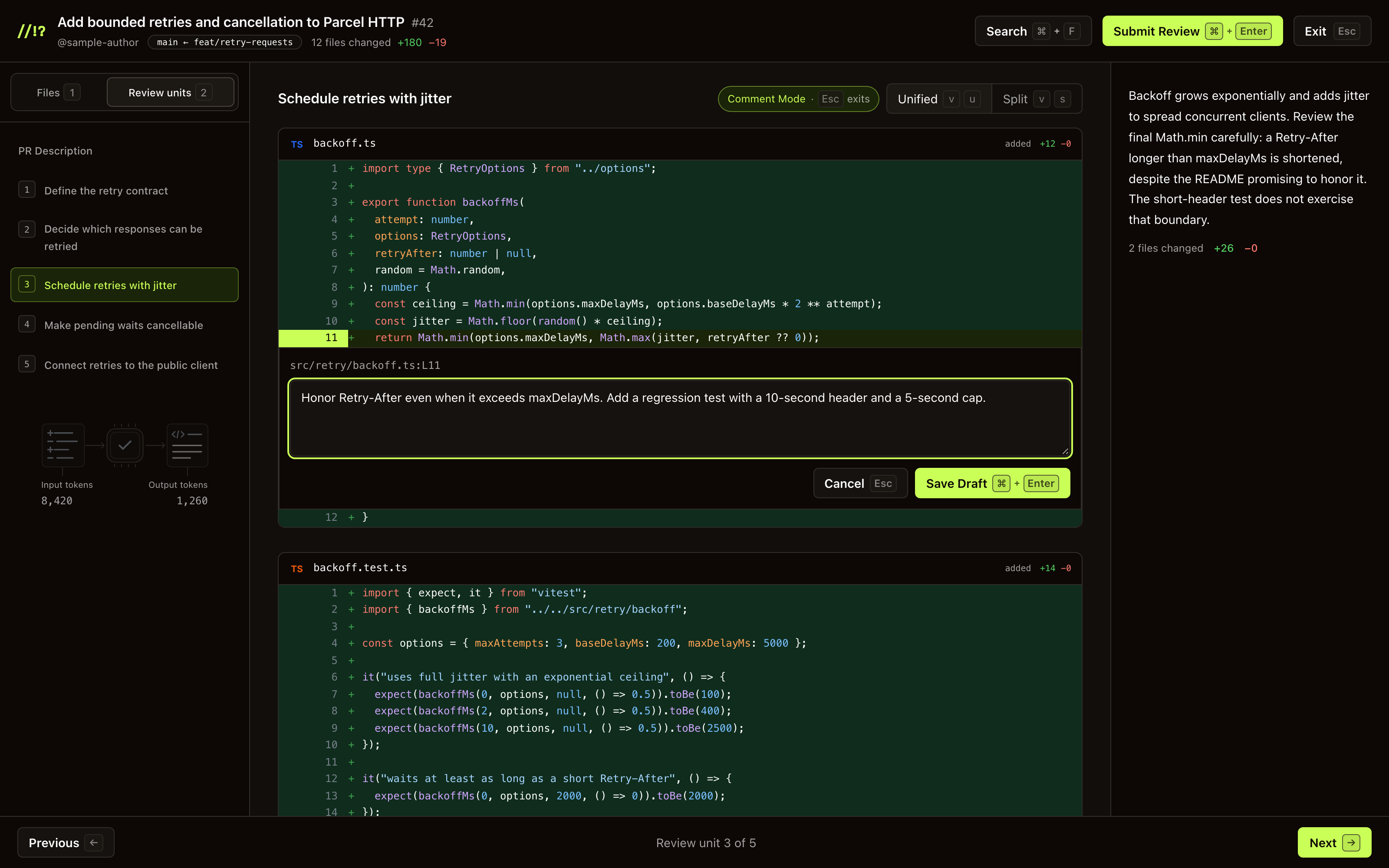
A draft on the line that caps the server’s delay. Select the screenshot for full size.
Drafts appear under the line range as Draft cards. They are stored with the active review session until you submit or discard them — they do not leave the browser until submit (Privacy & data).
Code review comment examples
These examples are illustrative. Check the actual code and agreed behavior before using one. The labels are plain text you can type into a comment; Guided Review does not assign severity or enforce them.
Correctness: show the input that exposes the defect
Instead of “This retry loop is wrong,” describe the boundary:
Issue (blocking): With retries = 0, this condition skips the initial
request. The option is documented as additional retries, so the request
should still run once. Please preserve that initial attempt and add a
regression check for zero retries.
Attach this to the condition, after tracing how the caller supplies the option. If the contract does not define whether the number counts retries or total attempts, ask that question first. A plausible interpretation is not yet a confirmed bug.
Tests: identify the mistake the assertion would miss
Instead of “Add more tests,” explain the missing evidence:
Issue (blocking): This test checks that timeoutMs exists, but would
still pass if the caller's 5 seconds reached the timer as 5 milliseconds.
Please check the value passed to the timer for that legacy input;
the compatibility contract requires 5000 milliseconds.
Read the test setup and the exercised path before posting. If another test already proves the conversion, point to it and remove the duplicate request. The review checklist explains how to choose evidence for a specific failure.
Questions: state what you have and have not established
Instead of “Why is this optional?”, make the uncertainty explicit:
Question: This type permits an omitted pageSize, and the builder sends
the request without it. Should omission preserve the server default?
I couldn't find that requirement in the PR description. Please confirm
the intended behavior before we decide whether this needs a change.
A question can still block approval when its answer determines correctness. Say so if that is the case. Do not present a model's explanation as proof of the requirement; follow the real diff and inspect unchanged callers when needed.
Suggestions: distinguish a preference from a required fix
Instead of “Rename this,” explain the reading cost and whether it blocks:
Suggestion (non-blocking): Could count be named totalAttempts here?
The loop includes the initial request, so that name would distinguish
it from the additional retries option. The current behavior looks right;
this is a readability preference.
Use the repository's naming rules when they exist. Do not make a personal preference a merge requirement without explaining the constraint. For feedback on tone and reasoning, Google's guide to writing review comments is a useful reference.
Copy a code review comment template
Paste this into a draft and replace the fields. Keep only the parts needed to explain one finding. For a question, state the missing decision instead of assuming an expected result.
[Issue / Question / Suggestion] [blocking or non-blocking, and why]:
With [input or condition], [code path] does [observed behavior].
The expected behavior is [contract or requirement], because [consequence].
Please [specific change or decision]. Verify with [reproduction or check].
Before sending, check that the line range still matches the current revision, the observation is supported by code or a reproduction, and the request has not already been answered elsewhere. Remove duplicate or resolved drafts. Keep feedback about the code and its consequences, rather than the person who wrote it.
In the extension, the label “blocking” does not select Request Changes. You choose the overall outcome separately in Submit Review. In the CLI, the same draft is a local note you can include in Generate Prompt; it is not posted to GitHub.
Edit or remove drafts
On a draft card:
- Edit — reopen the body, then save with
⌘/Ctrl+Enteror cancel withEsc. - Remove — drop that draft without posting.
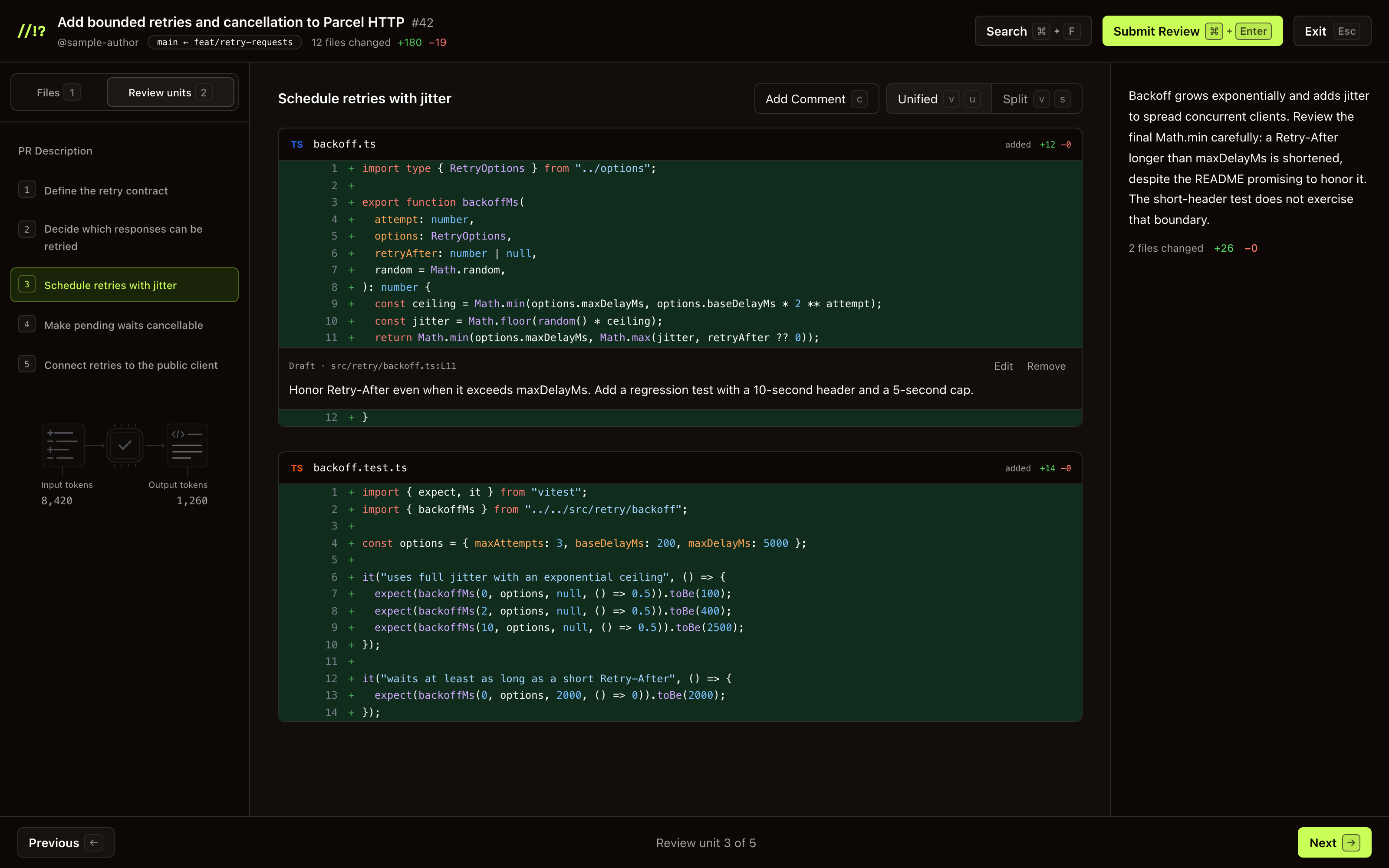
You can keep walking units and add more drafts before submitting once.
What gets posted
Extension: Nothing is sent to GitHub until you open Submit Review and confirm. Then every remaining draft is included as line comments on that review, along with the overall event type and optional summary. Details: Submit a review.
If the PR diff has changed since you drafted (rebase, force-push, new commits), GitHub may reject some line anchors — you’ll see an error on submit (Troubleshooting). Re-open the review, refresh the plan if needed, and re-draft on the current lines.
CLI: Notes never leave your machine via Guided Review. Generate Prompt builds a coding-agent prompt from them and copies it to the clipboard — Generate Prompt.
Tip. Prefer commenting as you go unit by unit, then submit (or Generate Prompt) once. That matches how GitHub review drafts work: one review, many line comments.
Next. Submit a review · Generate Prompt · CLI · Keyboard shortcuts