
A Chrome extension to review GitHub pull requests
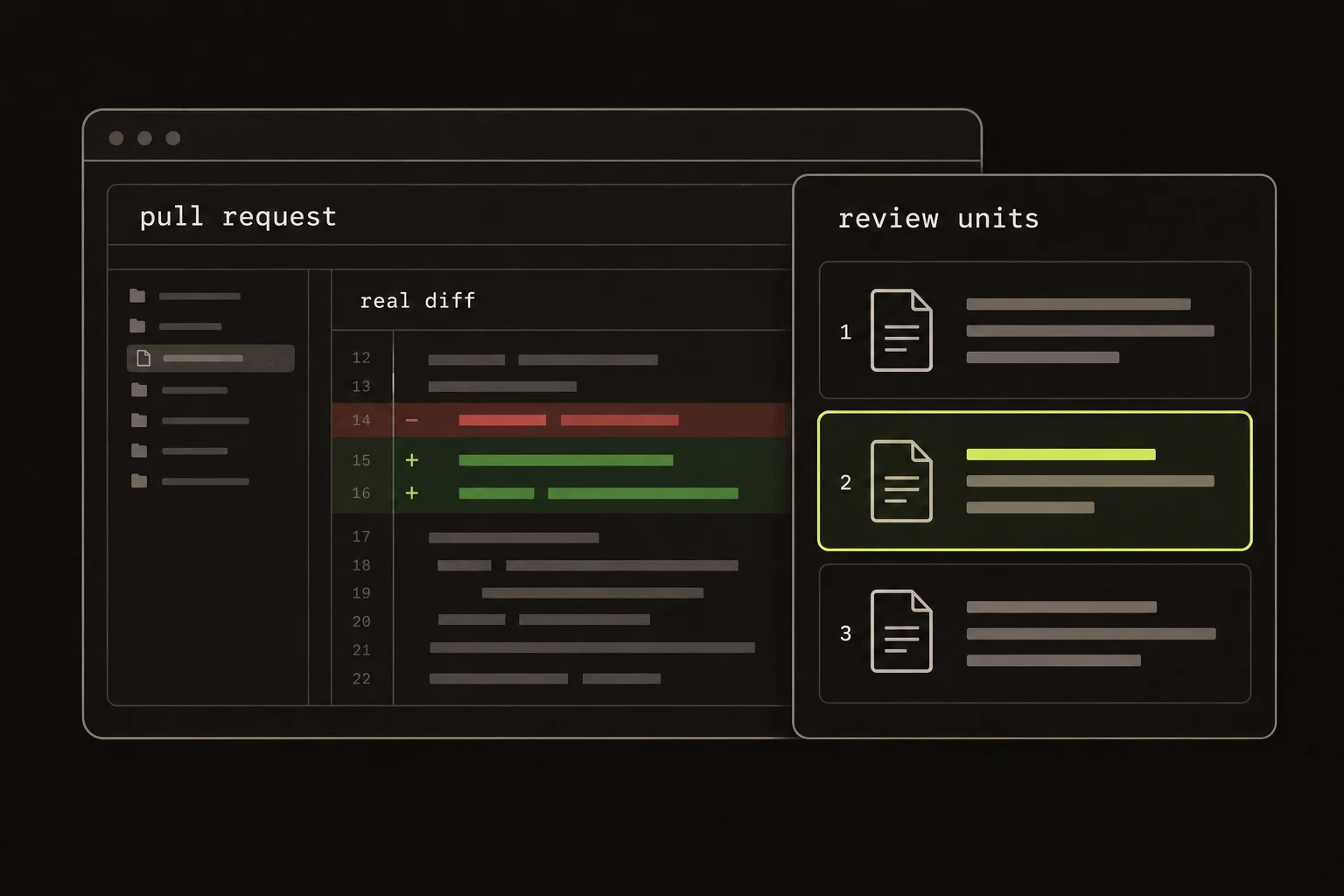
A new request option touches a type, a builder, two callers, and a test. GitHub gives you the files. You still have to work out which order explains the change.
I built Guided Review to help with that reading. Its Chrome extension opens an overlay on a github.com PR and groups related hunks into review units. You read the real diff, draft comments, and choose the review outcome.
A quick review path:
- Install the extension and open a GitHub PR.
- Follow related changes through the real diff.
- Check the commentary against the code.
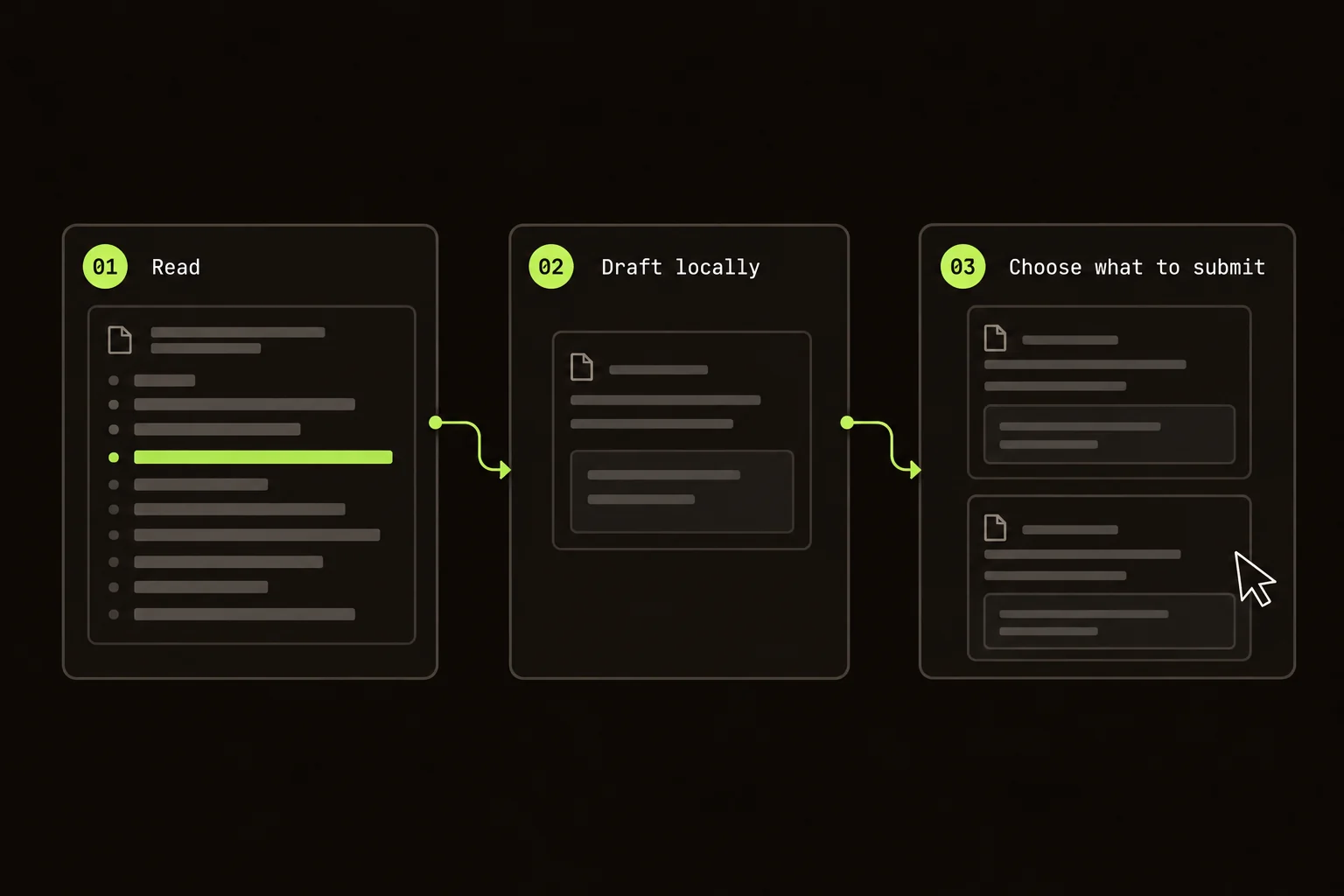
- Draft comments, then choose and submit your review outcome.
On this page
Set up the GitHub PR review extension
Install Guided Review from the Chrome Web Store. In Options, add your own Anthropic, OpenAI, or Grok key for AI grouping and commentary. Without a provider, you get one unit per file.
Open a github.com PR and choose Start Guided Review. The extension fetches the diff and opens the keyboard-first overlay. The first-review walkthrough covers the controls; the shortcut reference lists the keys.
It supports https://github.com/*. GitLab, Bitbucket, and GitHub Enterprise custom hosts aren't supported. For branch-vs-base, uncommitted work, or one local commit, use the CLI.
Follow the option from type to caller
For that request-option change, I'd start with the type and builder. Is the option required? When it's omitted, does the builder apply a default or leave the request alone?
Then read both callers. One might omit the option while the other passes an empty value. Those aren't necessarily equivalent.
Read the tests next, as a separate unit. A test with an explicit value tells you little about omission. Find the assertion that answers the question you're approving.
The model can put related hunks together. It can't decide what the default should be.
If CodeRabbit already provides automated feedback on the PR, you can keep it and use Guided Review for this reading pass. The CodeRabbit comparison includes a public PR you can try; the tool-selection guide covers the workflow tradeoffs.
Establish the review question before navigating
Use the PR description to identify the behavior and its constraints. For the request option, write down what should happen when the field is present, omitted, and empty. If a previous client can still call this endpoint, include that compatibility expectation. Three specific inputs give you a better reading route than a broad instruction to check the API.
Start at the type or parser that defines the accepted input. Follow the builder to the actual request. Then inspect the callers that supply the value. When the review plan puts these hunks together, read them as evidence for the same question. When it does not, use diff search or repository search to recover the missing dependency.
Keep the original GitHub context available for material outside the diff: the issue, earlier discussion, and any deployment constraints. The overlay organizes changed lines; it does not establish the product requirement or automatically include every dependency. If the PR description leaves the default undefined, ask the author before treating an implementation choice as the agreed behavior.
Check the commentary against the real diff
The model supplies structure and commentary only. Code displayed in the overlay comes from the parsed GitHub diff. Invalid hunk references are dropped, but a valid reference can still have a wrong explanation beside it.
I'd use “adds an optional field” to find where to read. Then I'd check what happens when nobody passes the field.
Follow the value into callers, defaults, and failure paths. If the answer depends on unchanged code, inspect the repository too.
Choose a reading layout for the question
Use split view when you need to compare an old condition with its replacement. Unified view is useful for following a small edit in sequence without moving between columns. Both display the same parsed diff. The choice changes the presentation, not the code or the model's understanding of it.
Move between units with the arrow keys when focus is outside an editable field. Open diff search with Command/Ctrl + F to find a path or a code fragment across the parsed patch. Search can help you find another changed caller, but cannot prove that no unchanged caller exists. Use the repository when that distinction matters.
Read production and test units in order, then compare the claim with the assertion. A test of an explicit nonempty option does not answer omission. Keep a short unresolved question until you find the condition and assertion that settle it. Visiting a unit is useful progress; it is not a correctness check.
Draft comments before choosing the outcome
Leave a line comment beside the branch that chooses the default. Keep reading. You can edit the draft before sending anything.
For concrete wording, use the code review comment examples and template. Separate a confirmed defect, an unanswered question, and a non-blocking suggestion before submitting.
Connecting GitHub through device flow is optional. It enables review submission from the overlay: Comment, Approve, or Request Changes. Reading and structuring don't require that connection. The extension never selects the outcome for you.
Make each comment carry the investigation
Attach the comment to the smallest useful line range. State what the code currently appears to do, the input that exposes the issue, and the decision you need. “This builder sends an empty value when the option is omitted; should omission preserve the server default?” gives the author a concrete path to inspect.
Distinguish a question about intent from a required correction. If the old client must remain supported, explain that constraint and the consequence of removing it. If you are suggesting a style preference, label it accordingly. The author should not have to infer which comments prevent approval.
Read your drafts together before submission. Two notes written at different points in the walkthrough may describe the same underlying issue, or a later caller may answer the first question. Remove resolved or duplicate drafts and keep the final comment focused. Drafting during the reading pass is useful because it preserves context; editing before sending makes the review easier to act on.
Recover from setup and provider failures
If the walkthrough opens without grouping or commentary, check whether a provider is configured. The file-by-file plan is still usable. If an AI request fails, read the error, confirm the selected account and model, and use the troubleshooting guide for the failing path. Repeating a request without changing the cause can repeat the failure and provider usage.
A GitHub connection problem concerns submission, which is separate from the provider setup. If you cannot submit, keep the drafts available while checking the connection. Do not assume an error means a review was successfully published; verify the result on the PR before trying again.
After the author pushes a fix, inspect the latest diff and the path affected by the change. A saved walkthrough or your memory of the previous version is not evidence for the updated code. Revisit the omission case, verify its test, and choose the review outcome based on that current evidence.
Keys and settings live in chrome.storage.local; active review state lives in chrome.storage.session. Requests go to GitHub and your configured AI provider. There's no Guided Review product backend. The data documentation covers storage and clearing it.
Guided Review is free and Apache-2.0. You pay your provider for usage.
When the normal GitHub diff is enough
For an obvious three-line change, I'd stay in GitHub's normal diff. There's no reading order to reconstruct.
Guided Review also doesn't provide a self-hosted appliance, automated findings, or a model-selected merge decision. It's for the person who still needs to understand the patch.
In this example, that means finding out what the missing option does.
FAQ
Which pull requests does the extension support?
It supports pull requests on github.com. It does not support GitHub Enterprise custom hosts, GitLab, or Bitbucket.
Do I need to connect GitHub?
Only if you want to submit Comment, Approve, or Request Changes from the overlay. Reading a PR and structuring it with your provider do not require device-flow connection.
Does the extension review or approve the code for me?
No. AI groups hunks and adds commentary. You read the real diff, write any comments, and select the review outcome.