
Review local git changes before opening a PR
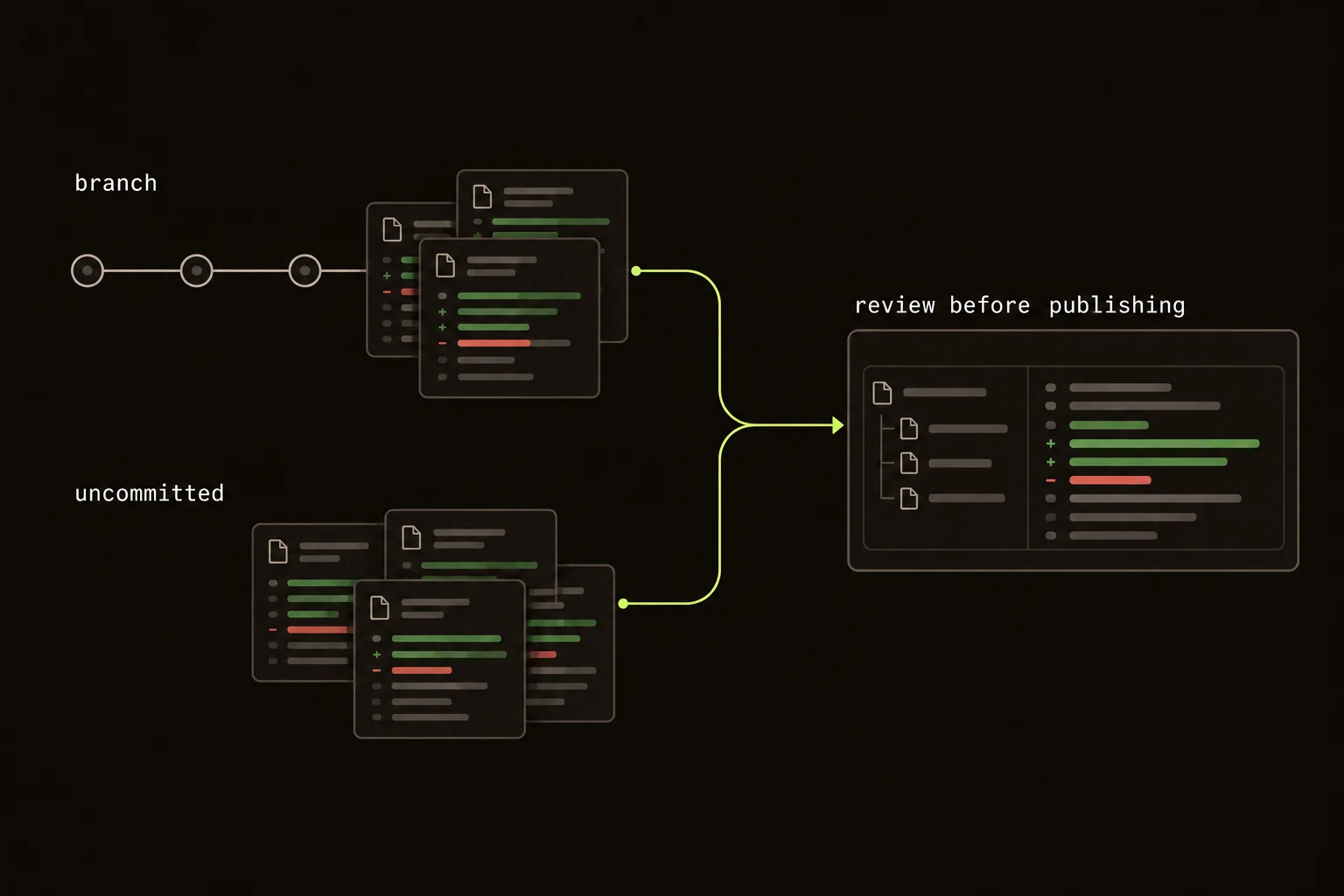
Before gh pr create, I want to check two things: the committed branch against its intended base, and the working tree. They answer different questions.
You review the retry loop. It looks right. You remember adding a test for zero retries, so you open the PR.
Except the test is still uncommitted. You've filled a hole in the branch diff with something you remember from your editor.
A quick review path:
- Choose the branch, commit, or working-tree diff you mean to review.
- Confirm the base and snapshot before following the changes.
- Record specific notes for the author or coding agent.
- Check the staged version and final diff before publishing.
On this page
Choose the local diff you actually mean to review
Guided Review's CLI opens a browser walkthrough from a git repository. It needs Node.js 22 or newer. Copy this command and run it in your repository:
npx @guided-review/cliThe package is @guided-review/cli; the binary is guidedreview. npx guided-review is a different tool.
Choose the scope before reading:
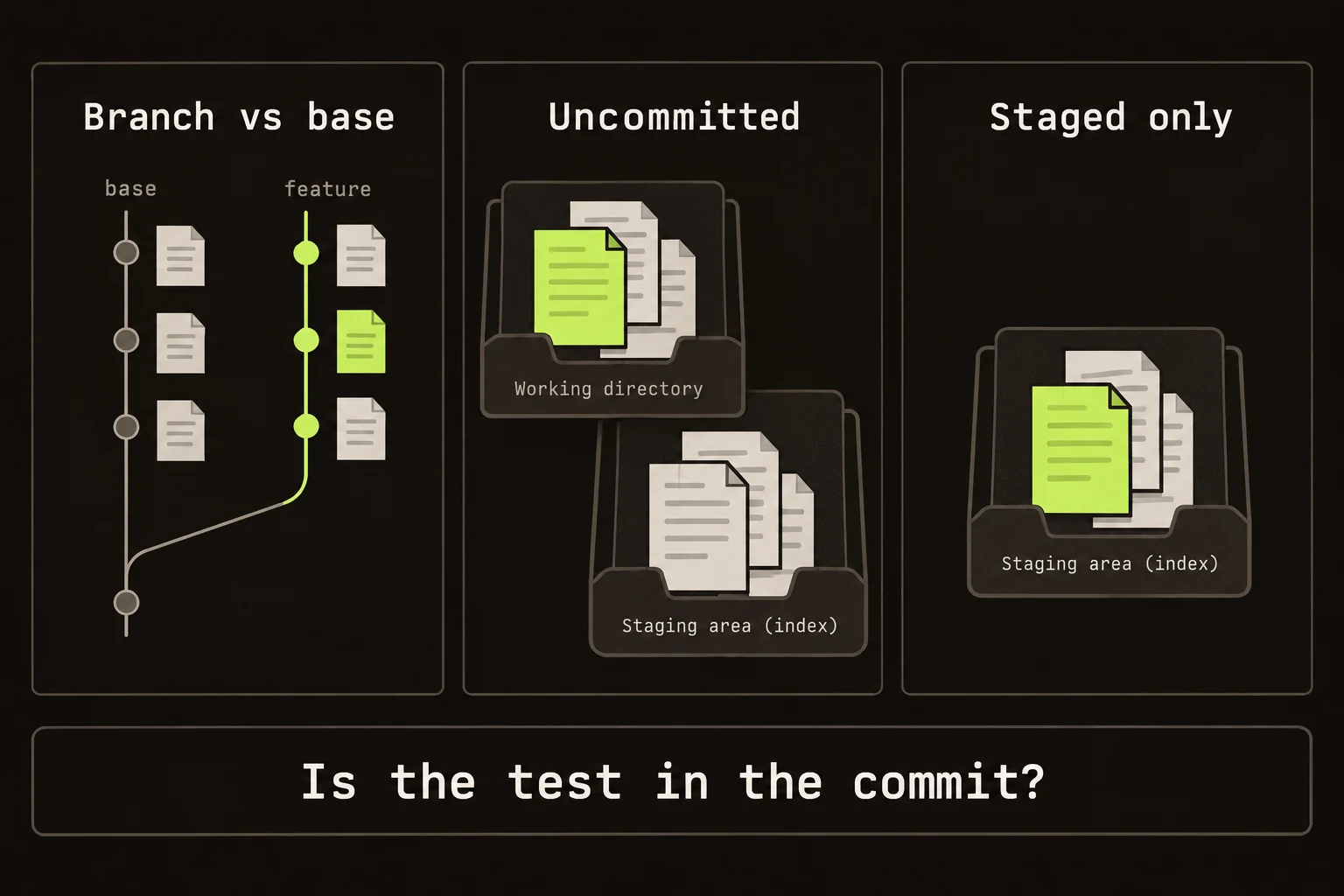
- Branch vs base shows committed work since the branches diverged. Use
--baseto select a particular base branch. - Uncommitted shows staged and unstaged work against
HEAD. - Unstaged shows the working tree against the index, so you can inspect edits made after staging.
- A specific commit shows that commit's patch.
The CLI reference covers the flags. Check untracked files too. A new test on disk isn't evidence that the PR contains it.
Uncommitted scope includes untracked files by default; --no-untracked excludes them. Branch scope contains committed work only. --staged starts an index-only review, which is useful when one file contains both changes you intend to commit and unfinished edits you want to keep local.
The initial walkthrough has one review unit per file and makes no model call. Structure With AI is an explicit action that sends a diff prompt to your configured provider for grouping and commentary.
Try a branch with an uncommitted test
This example creates a new temporary Git repository. It commits a change from one attempt to three, then leaves its test untracked. It uses Git and Node's built-in test runner; no project dependencies or provider key are needed.
Copy the whole block into a POSIX shell such as Bash or Zsh. The Git identity applies only to this example repository.
(
set -eu
example_dir=$(mktemp -d "${TMPDIR:-/tmp}/guided-review-example.XXXXXX")
cd "$example_dir"
git init -b main
git config user.name "Review Example"
git config user.email "review@example.invalid"
mkdir src test
printf 'export const maxAttempts = 1;\n' > src/options.mjs
git add src/options.mjs
git commit -m "Set the initial attempt limit"
git switch -c add-retries
printf 'export const maxAttempts = 3;\n' > src/options.mjs
git add src/options.mjs
git commit -m "Allow three attempts"
cat > test/options.test.mjs <<'TEST'
import assert from 'node:assert/strict';
import { test } from 'node:test';
import { maxAttempts } from '../src/options.mjs';

test('the default allows three attempts', () => {
  assert.equal(maxAttempts, 3);
});
TEST
node --test test/options.test.mjs
git status --short
printf 'Example repository: %s\n' "$PWD"
npx @guided-review/cli --base main
)
The test passes, but git status --short still lists ?? test/. In the browser, compare these two scopes:
| Scope | What you should see | What it proves |
|---|---|---|
| Branch vs base | src/options.mjs changes from 1 to 3. | This is the committed change a PR would contain. |
| Uncommitted | The new test/options.test.mjs file. | The test exists on disk but isn't in the branch's committed patch. |
The test checks the default value, not a retry loop. A real implementation also needs evidence for attempt counting, exhausted retries, and cancellation where those behaviors apply.
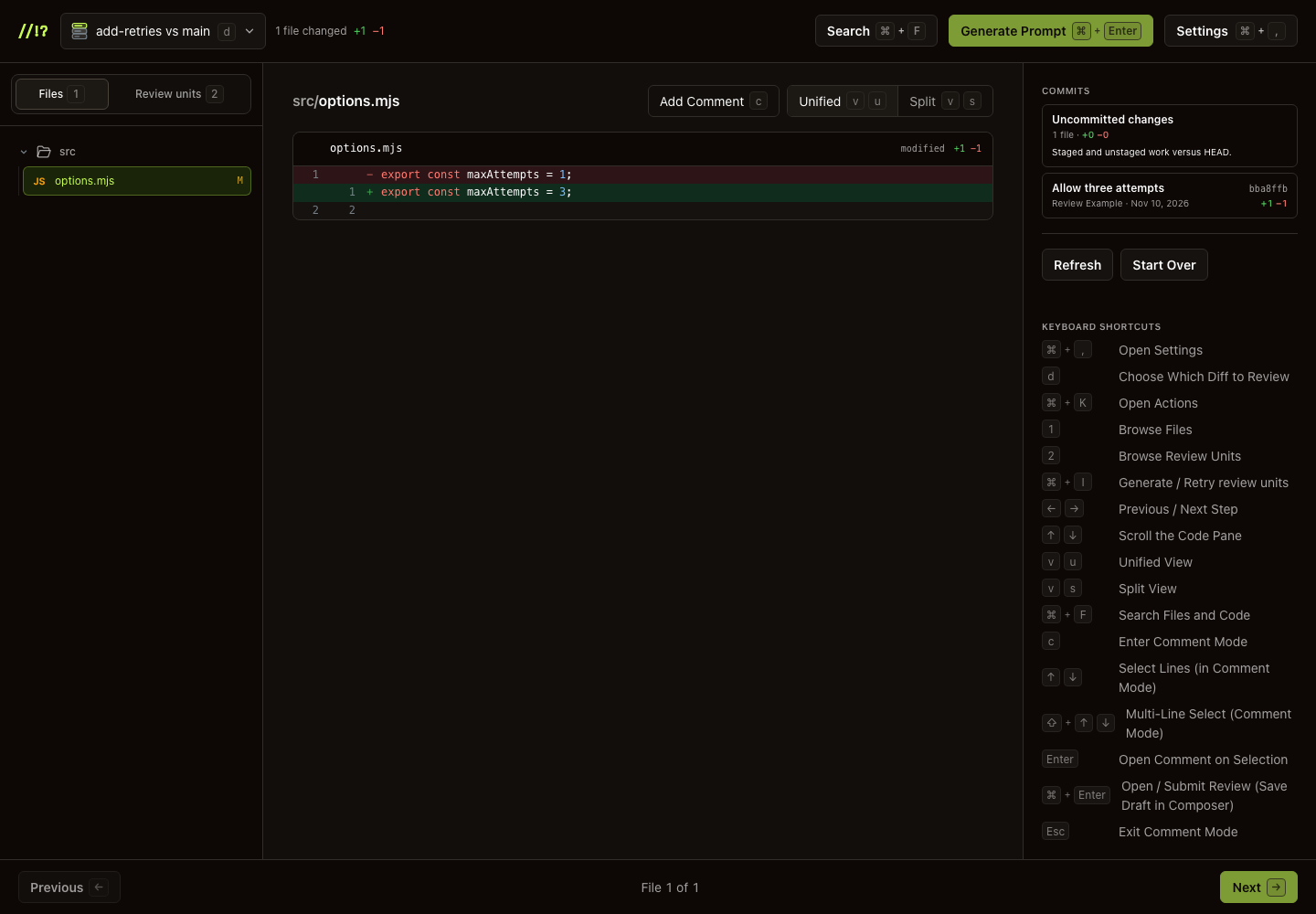
Branch vs base contains the committed option change. Switch to Uncommitted to read the test still on disk.
In a second terminal, enter the path printed after Example repository. Run git add test/options.test.mjs and git commit -m "Test the default attempt limit". Refresh the diff in Guided Review. Branch vs base now includes both files, and Uncommitted is empty. Stop the local server with Ctrl+C when finished.
You can do this entire scope check without AI. If you request Generate review units, the diff goes to your configured provider for grouping and commentary.
Read the retry contract before its test
Suppose the change adds retries: 3. Does that mean three attempts, or an initial attempt followed by three retries?
Read the option type, loop, and caller together. Then check zero. Does the request run once or not at all?
Now read the test. Does its expected count match that contract? Is it exercising the same path? If it's in the working tree, switch scope and inspect it there.
I prefer production changes and tests in separate review units. First work out what the loop does. Then decide whether the test would catch the off-by-one error.
Establish the base and the snapshot
Start by checking the branch you are on and the branch the PR will target. If the intended target is main, make that explicit with npx @guided-review/cli --base main. For a stacked change, choose the parent branch that actually represents the comparison you want. Reviewing against the wrong base can include work the reviewer already accepted or hide a dependency you have not explained.
The branch comparison uses the merge base and the current committed HEAD. It does not mean “everything visible in my editor.” Before reading, inspect git status --short and note whether the working tree contains additional production code, tests, or configuration. That small inventory prevents you from mentally importing unfinished work into the committed patch.
Use the scope dropdown deliberately. Read the branch to understand the proposed published change, then inspect uncommitted work to decide what belongs with it. A specific-commit review answers what that commit changed; it is not a substitute for the full branch review when later commits alter the same behavior.
Check the staged version when a file has mixed work
Suppose you stage the retry implementation, then edit the same file to add logging. The file on disk and the version in the index now differ. A passing test against the working tree may exercise logging or error handling that will not be in your next commit.
Inspect git diff --cached for the staged patch and git diff for the remaining edits. These commands answer different questions. Use an index-only walkthrough when that is the boundary you plan to publish. Avoid assuming a file is entirely staged because its path appears in the staging area.
For new files, confirm that they are tracked before relying on them as part of the PR. A test may appear in an uncommitted walkthrough and pass locally while still being absent from the branch. The final check is the committed change after you have staged and committed the intended files. Inspect that resulting scope again if the composition changed during review.
Send specific notes back to a coding agent
Leave a line note where the behavior is unclear. Generate Prompt formats your notes into a prompt you can copy into a coding agent. It runs locally and doesn't make another model call. You choose where to paste it.
It doesn't run the agent or verify the fix. After the edit, read the new diff and run the repository's relevant tests, typecheck, lint, or build.
Give each note enough context to preserve the decision. For the retry loop, write the input, observed count, and expected contract: “With zero retries, the initial attempt should still run once; this condition appears to skip it.” Keep separate questions separate, so an agent does not have to infer which requirement governs a broad cleanup request.
After applying the generated task, check the changed implementation and the test independently. A new test that expects zero attempts would make the suite green without addressing the requested contract. Also inspect adjacent edits introduced during the fix. A local agent pass can widen the patch just as easily as the original implementation did.
Notes live with the running server. Copy what you need before stopping it. The CLI doesn't submit GitHub reviews; the extension handles that once a PR exists.
Check what will actually be published
Check that the branch includes the test, migration, generated files, configuration, or documentation the change depends on. Exclude local-only files. Run the checks after the final edit, rather than relying on a green run from before it.
The local server binds 127.0.0.1:7182 by default. AI structuring still sends code to your provider. There's no Guided Review backend receiving it, but local review doesn't mean offline inference.
This is a local reading tool. There's no hosted team dashboard, automated findings, or merge gate. For an existing GitHub PR, I'd use the extension instead.
Before publishing the retry change, I'd check that the zero-retries test made it into the branch.
Already using an automated PR reviewer? Keep that feedback and do your own reading pass. The CodeRabbit comparison includes a public PR trial; the tool-selection guide explains which workflows each tool covers.
Write a handoff someone else can verify
Turn the completed local pass into a short PR description: intended behavior, important compatibility choices, checks run, and unresolved questions. For the retry change, state whether the configured number counts retries or total attempts. Mention the zero case explicitly if that was the source of uncertainty. The next reviewer should not have to recover that decision from your private agent conversation.
Record the actual check commands and their results after the last relevant edit. If an integration test requires a service you did not start, distinguish that gap from the focused tests you did run. Do not describe the whole change as tested because a narrow helper test passed.
Before stopping the local server, copy any notes you still need. Session notes are held in memory; they are not a durable PR record. Once the PR exists, a teammate can use the GitHub extension workflow for an independent reading pass. Your local progress helps you prepare the change, but the handoff evidence is what lets someone else assess it.
FAQ
What should I review before gh pr create?
Review the committed branch against its intended base, then inspect staged, unstaged, and untracked work so the PR contains the change you actually checked.
Does the CLI call an AI provider when it starts?
No. It starts with one review unit per file. Structure With AI is an explicit opt-in action that sends the diff prompt to your configured provider.
Can the CLI submit a GitHub review?
No. Local notes stay in the running session. Generate Prompt copies them for a coding agent; the Chrome extension handles optional GitHub submission.